
Most email footers are an afterthought. Yours might be sabotaging you.
A single unsubscribe link — 9pt gray text, hidden in the background — is not a compliant footer. It’s not trustworthy. And it’s not helping you.

It might even be costing you deliverability, clicks, and credibility.
Because while mailbox providers don’t scan footers directly, your subscribers do. And if they don’t trust what they see — if it feels confusing, vague, or anonymous — they’ll click the button that hurts you most: Spam.
This guide breaks down what belongs in your footer, what the laws actually say, and how to make your footer do more than just check a box.
What the law actually says (no legalese required)
| Law | Who it affects | What you must include | Notes |
|---|---|---|---|
| CAN-SPAM (U.S.) | Anyone emailing U.S. residents | - Physical mailing address - Clear unsubscribe link | Must process unsubscribes within 10 business days |
| CASL (Canada) | Anyone emailing Canadians | - Sender name - Mailing address - Valid contact method (email, phone, or form) - Unsubscribe link | Requires express consent. Penalties can reach $10M CAD |
| GDPR (EU/EEA) | Anyone collecting or emailing EU residents | - Identity of the data controller - Data use disclosure - Link to privacy policy | Footer is often where this info is summarized |
| Spam Act 2003 (Australia) | Anyone emailing Australians | - Accurate sender info - Functional unsubscribe link | Must process unsubscribes within 5 business days. Consent must be clear or inferred |
If you're emailing internationally, your footer should always include:
- Your business name
- A real mailing address
- A visible unsubscribe link
- A valid contact method
- A link to your privacy policy (for GDPR)
What if I don’t want to share my home address?
Totally fair, especially if you're a solo business owner or creator working from home. But here’s the thing:
You’re still legally required to include a valid physical mailing address in your emails.That’s true under CAN-SPAM (U.S.), CASL (Canada), and Australia’s Spam Act. Just a city/state or a made-up line won’t cut it.
So if you don’t want to list your home address, you’ll need a compliant alternative.
Acceptable Options
-
PO Box (USPS)
- Basic but acceptable under CAN-SPAM. May appear less professional.
-
Private Mailbox (PMB)
- Offered by UPS Stores and mailbox centers. Appears as a real street address with a suite number.
- Typically costs $20–40/month.
-
Virtual Mailboxes
- Services like iPostal1, Earth Class Mail, and Anytime Mailbox offer real street addresses and digital mail management.
-
Kit (fka ConvertKit)
- If you use Kit, they provide a free mailing address specifically for CAN-SPAM compliance. It’s not for receiving mail, but it checks the legal box.
-
Your LLC’s Registered Agent Address
- Some registered agents allow their address to be used as your business mailing address. Check your provider’s terms before using it.
-
Coworking Spaces
- Some spaces offer virtual office services with mailing privileges. Check what’s included.
What Not to Do
- List only city/state (“Brooklyn, NY”)
- Omit building numbers or suite info
- Use fake addresses (“123 Nowhere Lane”)
- Obscure your footer in tiny, unreadable font
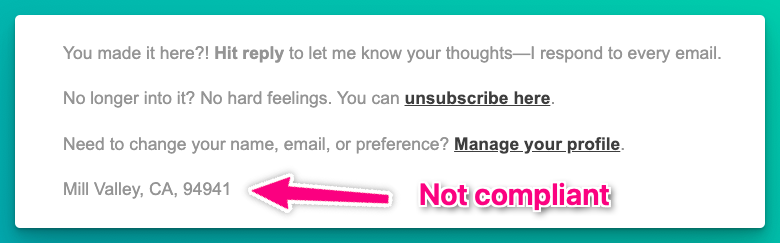
You don’t need to list your home, but you do need a verifiable, legitimate address.
Anatomy of a footer that actually does its job
Must-Haves
- Business name
- Physical mailing address
- Unsubscribe link
- Contact method (email or form)
- Privacy policy link
Smart Adds
- Website or domain name
- Permission reminder
- Real reply-to address
Brand Builders
- Microcopy or sign-off with personality
- Social media links (if active)
- Accessibility note
A trustworthy footer won’t boost your deliverability on its own, but it reduces confusion, builds credibility, and helps prevent spam complaints — and those are signals mailbox providers do care about.
If your emails are viewable in the browser or archived publicly, linking back to your domain can also reinforce your brand’s identity across platforms. It won’t move mountains for SEO, but it creates consistency Google can crawl.
Should you include a preference center?
Yes, if you have one. Preference centers let subscribers:
- Choose email frequency
- Pick topics they care about
- Update contact info
- Pause or snooze messages
Just don’t use a preference center to hide the unsubscribe. You still need a clear, direct opt-out link in every email.
Footer swipe templates
Plain text (Minimalist + Compliant)
You’re receiving this because you signed up at inboxwelcome.com.
Inbox Welcome LLC, 123 Maple Street, Sunnyvale, CA 94086
hello@inboxwelcome.com
Unsubscribe: [unsubscribe link] | Privacy Policy: inboxwelcome.com/privacy
With brand voice + preferences
Still reading? You’re our kind of human.
You're on this list because you opted in at inboxwelcome.com.
Prefer fewer emails? [Update preferences] or [Unsubscribe]
Inbox Welcome LLC, 123 Maple Street, Sunnyvale, CA 94086
hello@inboxwelcome.com
HTML Version (Styled)
<p style="font-size:14px; line-height:1.5; color:#4A4A4A;">
You're receiving this because you signed up at <a href="https://inboxwelcome.com" style="color:#C40028;">inboxwelcome.com</a>.<br><br>
<strong>Inbox Welcome LLC</strong><br>
123 Maple Street, Sunnyvale, CA 94086<br>
<a href="mailto:hello@inboxwelcome.com" style="color:#C40028;">hello@inboxwelcome.com</a><br><br>
<a href="[unsubscribe]" style="color:#C40028;">Unsubscribe</a> |
<a href="[preferences]" style="color:#C40028;">Update Preferences</a> |
<a href="https://inboxwelcome.com/privacy" style="color:#C40028;">Privacy Policy</a>
</p>
Time for a quick footer audit
Ask yourself:
- Does my footer include a business name and real address?
- Is the unsubscribe link easy to find and functional?
- Is there a way to reply or contact me?
- Is there a privacy policy if I collect personal data?
- Would a first-time subscriber instantly recognize who this email is from?
If not, it’s time to fix it. You can grab one of the templates above and start fresh today.
Don’t let your footer whisper when it could say, “I’ve got this.”
Want to see real footer fails in the wild?
Every day, we share one real-world inbox mishap — from broken links to ghost-footers to emails that forgot who they were talking to.
It’s short, useful, and occasionally hilarious. It’s called Mail Fails, and you can subscribe in 30 seconds or less.